How to update site logo and title ?
Go to Dashboard->Design->Website option, here you can change the Home page title, description, logo and favicon image.
.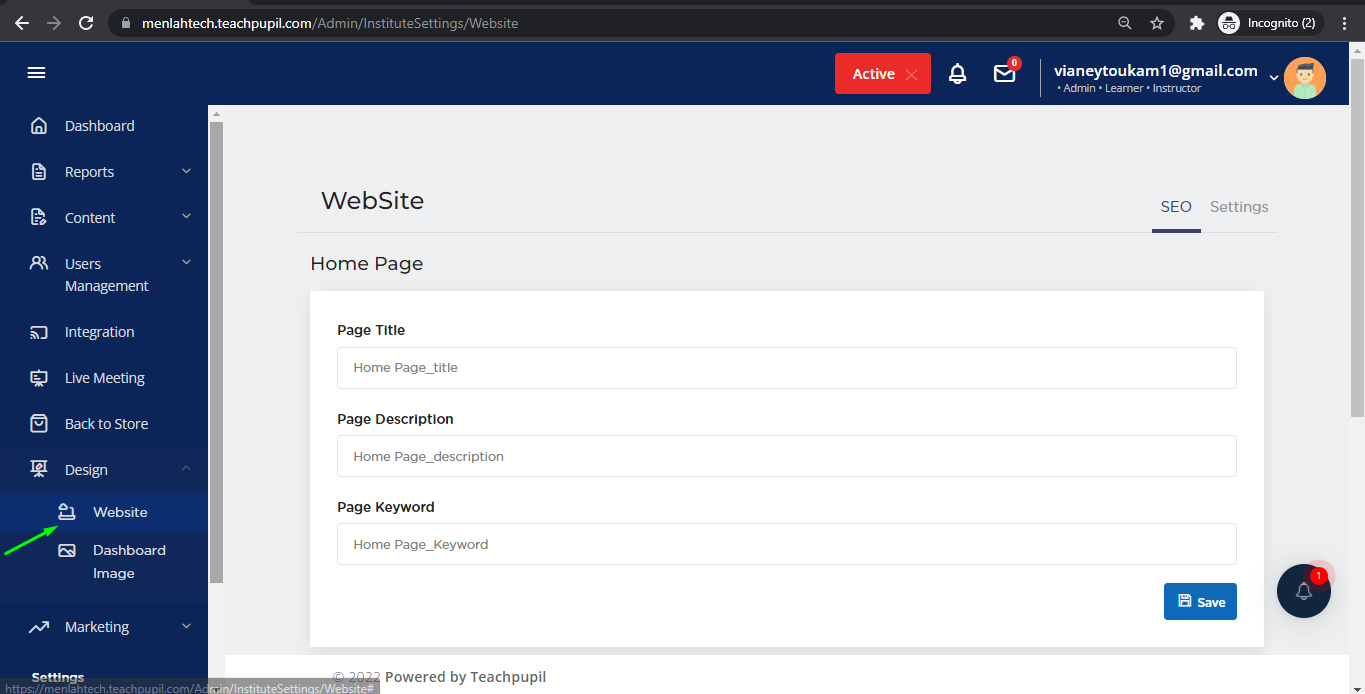
In SEO section , update the Page Title, Page Description and Page Keyword.
Once you click on the Save button, the changes are updated and a validation message "Home page SEO saved Successfully".
Now move to Settings section to change the site Logo and Favicon image.
Make sure the height and width of logo image be 300px and favicon image be 16x16 or 32x32.
Click on the upload button to save the images.
Related Articles
How to update the pricing plan for your course?
Pricing your course right is as imperative as creating valuable content for your learners. Once you have created your course, determining your pricing structure is the next important step. Go to the “Courses” page and click on the details icon to ...How to add video files into your course content?
You have the option to add the video content here. The uploaded videos are completely secured and non-downloadable. You can also embed YouTube and Vimeo videos here. Steps to Add a Video Log in to the platform and click on the Content available in ...How to Add Announcements ?
How to Add Announcements - 1. Go to Announcements tab under contents tab. 2. Click on Add announcement button. 3. Enter title and description, then click on save button.How learner can Start a new project ?
1. Go to My Projects page. 2. Click on Start a New Project button. 3. Then Select tech of the project from the list of options. 4. Then select domain of the project from the list of options. 5.Now Project title and Project code will be displayed of ...How to edit/delete chapter items from Assets Library?
Once the Assets are saved in course builder, you can edit/delete it from the Asset Library as well. Go to Dashboard->Content->Asset Library You'll see the list of Assets, from the Action section you can either edit/delete the details of chapter ...